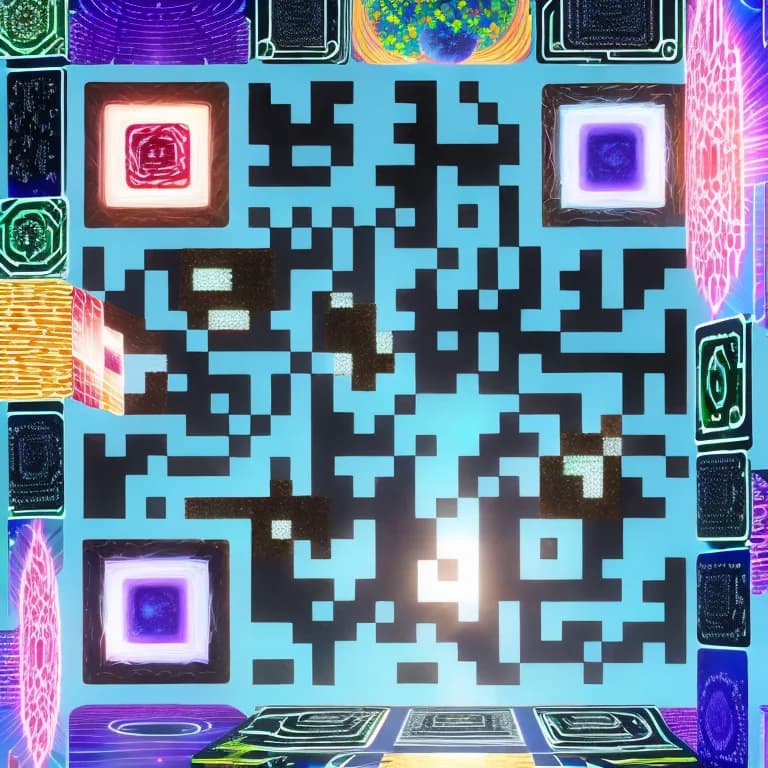
Let's be honest: standard QR codes are not exactly beautiful. They are functional black-and-white grids that people tolerate rather than appreciate. On a restaurant table, they look clinical. On a wedding invitation, they look out of place. On product packaging, they look like an afterthought.
And that is a problem, because a QR code that blends into the background is a QR code that gets ignored. Research from MobileIron found that branded and visually customized QR codes see scan rates up to 30% higher than plain black-and-white squares. People are more likely to engage with something that looks intentional, designed, and worth their attention.
That is exactly why QR-Verse built an AI QR code art generator directly into the QR code creation workflow. Instead of settling for a standard code with a logo slapped in the center, you can now generate fully original artwork where the QR pattern is woven into the design itself. A watercolor painting that is also a scannable QR code. A cyberpunk cityscape that opens your website. A floral pattern that links to your wedding RSVP page.
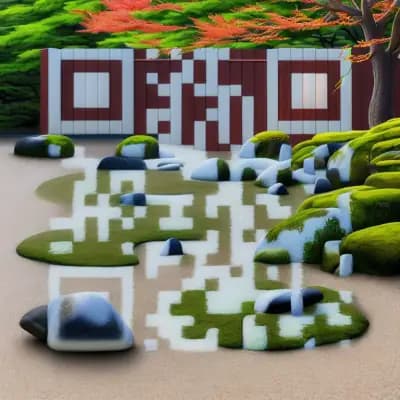
This guide covers everything you need to know about using an AI QR code art generator: how the technology works, how to create your first AI art QR code step by step, how to write effective prompts, advanced settings to fine-tune your results, practical use cases across industries, and how the top tools compare. Whether you are a small business owner, a marketer, or a couple planning a wedding, you will find actionable guidance here.
Key Takeaways
- Branded and visually customized QR codes see scan rates up to 30% higher than plain black-and-white squares, according to MobileIron research.
- QR-Verse's AI Art Generator uses ControlNet + Stable Diffusion - the QR pattern is woven INTO the artwork, not placed on top of it.
- The generator includes 130+ style presets covering watercolor, cyberpunk, floral, minimalist, and dozens of other aesthetics.
- Both free and paid users can generate AI QR art directly in the QR code creation workflow with no design experience required.
- Dynamic AI QR codes let you update the destination URL after printing, so your artwork never becomes outdated.
Want to try this yourself? The generator is free and opens straight away.
Create a QR codeWhat Is an AI QR Code?
An AI QR code is a QR code where the functional pattern - the arrangement of light and dark modules that scanners read - has been integrated directly into a piece of AI-generated artwork. This is fundamentally different from the basic customizations you might be used to, like changing colors, rounding corners, or overlaying a logo.
The Technology Behind It
QR-Verse's AI Art Generator uses ControlNet combined with Stable Diffusion, two of the most significant breakthroughs in generative AI imaging. Here is how they work together:
Stable Diffusion is the AI model responsible for creating the artwork itself. Give it a text prompt like "a Japanese zen garden at sunrise, watercolor style," and it generates a completely original image matching that description. It works through a process called diffusion - starting with random noise and gradually refining it into a coherent image guided by your prompt.
ControlNet is the layer that makes the magic possible for QR codes. It acts as a structural constraint on the image generation process. ControlNet takes your QR code pattern as input and forces the AI to incorporate that pattern into the artwork. The dark and light modules of the QR code become part of the composition - shadows, textures, objects, and negative space are arranged so that the underlying QR pattern remains scannable.
The key insight is this: the QR pattern is encoded INTO the artwork, not placed ON TOP of it. There is no transparent overlay. There is no logo sitting in the center covering the code. The AI actually understands the required light-dark contrast map and paints around it, creating art that IS the QR code.
Why This Is Different from Filters or Logo Overlays
Adding an Instagram filter to a QR code changes its appearance but does not integrate the pattern into meaningful art. Overlaying a logo covers part of the QR code and relies on error correction to compensate. Neither approach produces something that a person would describe as "beautiful."
An AI art QR code is different because the entire image is generated with the QR functionality as a structural foundation. The result is a single, cohesive piece of art that happens to be scannable. When someone looks at it, they see artwork first and a QR code second - and that shift in perception is what drives higher engagement.
AI art QR codes are still QR codes at their core. They follow the same QR specification and are read by the same scanner apps and camera software on every phone. The artistic layer does not require any special technology to scan - it just requires careful balance between visual creativity and scannable contrast, which is exactly what ControlNet handles.
How AI QR Code Art Actually Works
Understanding how an AI QR code art generator works under the hood helps you get better results. You do not need a computer science degree - here is the process explained in plain terms.
The Diffusion Process: From Noise to Art
Every AI-generated QR code starts as random noise - think of a TV screen full of static. The AI model then runs a series of "denoising steps" (typically 30 to 50), gradually cleaning up that static into a coherent image. At each step, the model uses your text prompt as a guide, nudging the image toward what you described.
This is why prompts matter so much. The model is literally asking "does this look like a Japanese zen garden?" at every step and adjusting accordingly. More specific prompts give the model a clearer target to aim for.
ControlNet: The QR Code Constraint
Here is where it gets interesting. Without ControlNet, the AI would generate a beautiful image with zero QR functionality. ControlNet adds a second signal alongside your prompt: the QR code pattern itself, represented as a grayscale map of light and dark zones.
At every denoising step, ControlNet checks whether the emerging image maintains sufficient contrast in the right places - the places where your QR code's dark and light modules need to be. It is a constant negotiation between artistic freedom and structural accuracy.
The QR Visibility slider (ControlNet scale) controls how loudly that structural signal speaks. Crank it up, and the QR pattern dominates. Lower it, and the art takes over - at the risk of the code becoming unscannable.
Why Luminance Contrast Is the Key
QR code scanners do not see color - they see brightness. A red module next to a green module might look different to your eyes, but if they have the same luminance (brightness value), the scanner cannot tell them apart.
This is why certain art styles work better than others for QR codes. Styles with strong light-dark contrast - like a bright sunset over a dark ocean, or white flowers against a dark garden - give the scanner clear boundaries to read. Styles where everything is similarly bright or similarly dark - like a foggy landscape or a neon-on-neon pattern - make the scanner struggle.
The best AI QR code art generators, including QR-Verse's engine, handle this automatically by biasing the generation process toward high luminance contrast in critical areas.
When writing custom prompts, include contrast-friendly elements: dark backgrounds with bright subjects, dramatic lighting, strong shadows, or clear foreground-background separation. The phrase "dramatic lighting, high contrast" at the end of any prompt noticeably improves scannability.
AI QR Code vs Standard QR Code
Understanding the difference between AI-generated QR codes and standard QR codes helps you decide when to use each. Here is a detailed comparison.
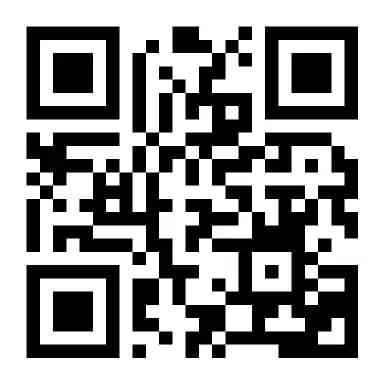
Standard QR Code
AI Art QR Code
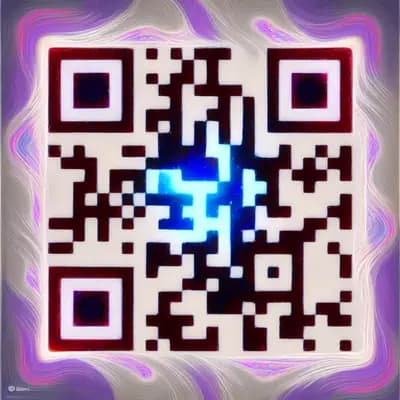
Visual Comparison
A standard QR code is a functional grid of black and white modules. It does its job - encoding data that scanners can read - but it contributes nothing to the visual identity of your brand, event, or product. It looks the same whether it belongs to a luxury fashion house or a parking meter.
An AI art QR code transforms that same functional grid into a piece of original artwork. The QR pattern is still there, still scannable, but it is woven into an image that tells a story, matches a brand, or captures attention. The visual transformation is dramatic.
Performance Difference
| Metric | Standard QR Code | AI Art QR Code |
|---|---|---|
| Scan rate | Baseline | Up to 30% higher |
| Time-to-scan | Immediate | Immediate (same technology) |
| User engagement | Functional only | Creates curiosity and conversation |
| Brand alignment | None (generic black/white) | Fully customizable to brand identity |
| Social media sharing | Rarely shared | Frequently shared as visual content |
| Print integration | Stands out (negatively) | Blends into design |
| Cost | Free | Credits starting at $0.05/image |
When to Use Each
The good news? Creating static QR codes is completely free on QR-Verse - unlimited, no watermarks, with full design customization. The free plan also includes 1 dynamic QR code with 60-day analytics. You can always start with a free code and add AI art or upgrade to Pro later when it matters most. For a deep dive into all free features, see our free QR code generator guide.
How to Create Your First AI Art QR Code
Creating an AI art QR code on QR-Verse takes less than two minutes from start to finish. Here is the full walkthrough showing you exactly how to make QR code art with AI.
Go to the QR code creator and choose your type
Visit the QR-Verse create page and select the type of QR code you want: URL, WiFi, vCard, email, phone, text, or any of the 20+ supported types. The AI art feature works with every QR code type - it does not matter what data you are encoding.
Enter your content
Fill in the relevant fields for your chosen QR type. For a URL code, paste your link. For a WiFi code, enter your network name and password. For a vCard, add your contact details. The content you enter here determines what happens when someone scans your finished artwork.
Navigate to Step 3 (Customize) and find the AI Art panel
After entering your content, proceed to the Customize step. You will see the standard design options (colors, patterns, logos) along with the AI Art Generator panel. This is where the creative process begins.
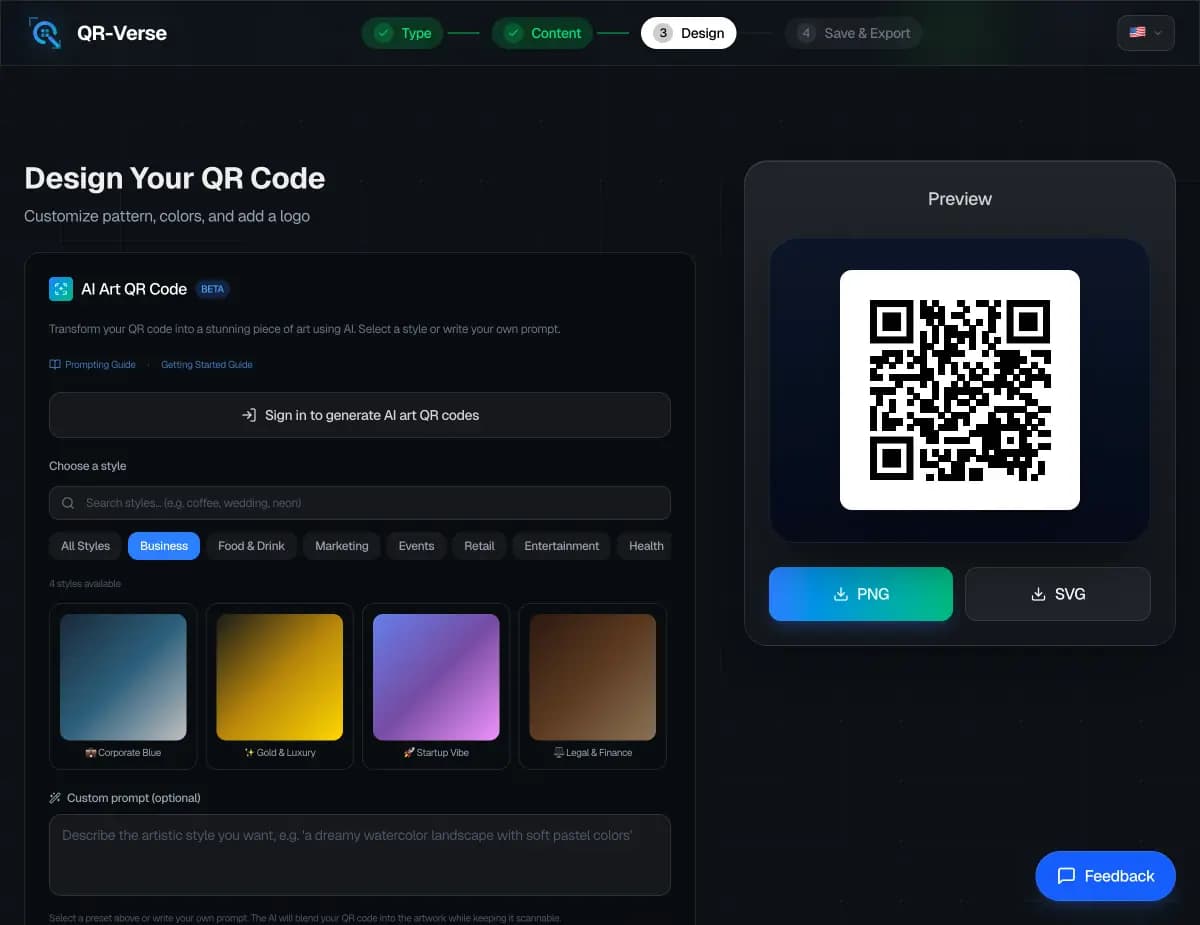
Browse 130+ style presets or write a custom prompt
You have two paths: choose from over 130 curated style presets organized across 26 categories, or write your own custom prompt with up to 1,000 characters. Presets are optimized for QR readability and produce consistently great results. Custom prompts give you full creative control. You can also start with a preset and modify it as a starting point.
Adjust advanced settings (optional)
Fine-tune two key parameters if you want more control. QR Visibility (ControlNet scale, 0.5 to 3.0) determines how strongly the QR pattern shows through the art. Prompt Adherence (guidance scale, 5 to 20) controls how closely the AI follows your text prompt versus taking creative liberties. The defaults work well for most cases.
Generate and pick from 4 variations
Hit generate and wait 30 to 90 seconds. The AI creates 4 unique variations at 768x768 pixels, each interpreting your prompt differently. Browse all four, compare them, and select the one that best fits your needs. Each variation is a completely original image - not minor tweaks of the same base.
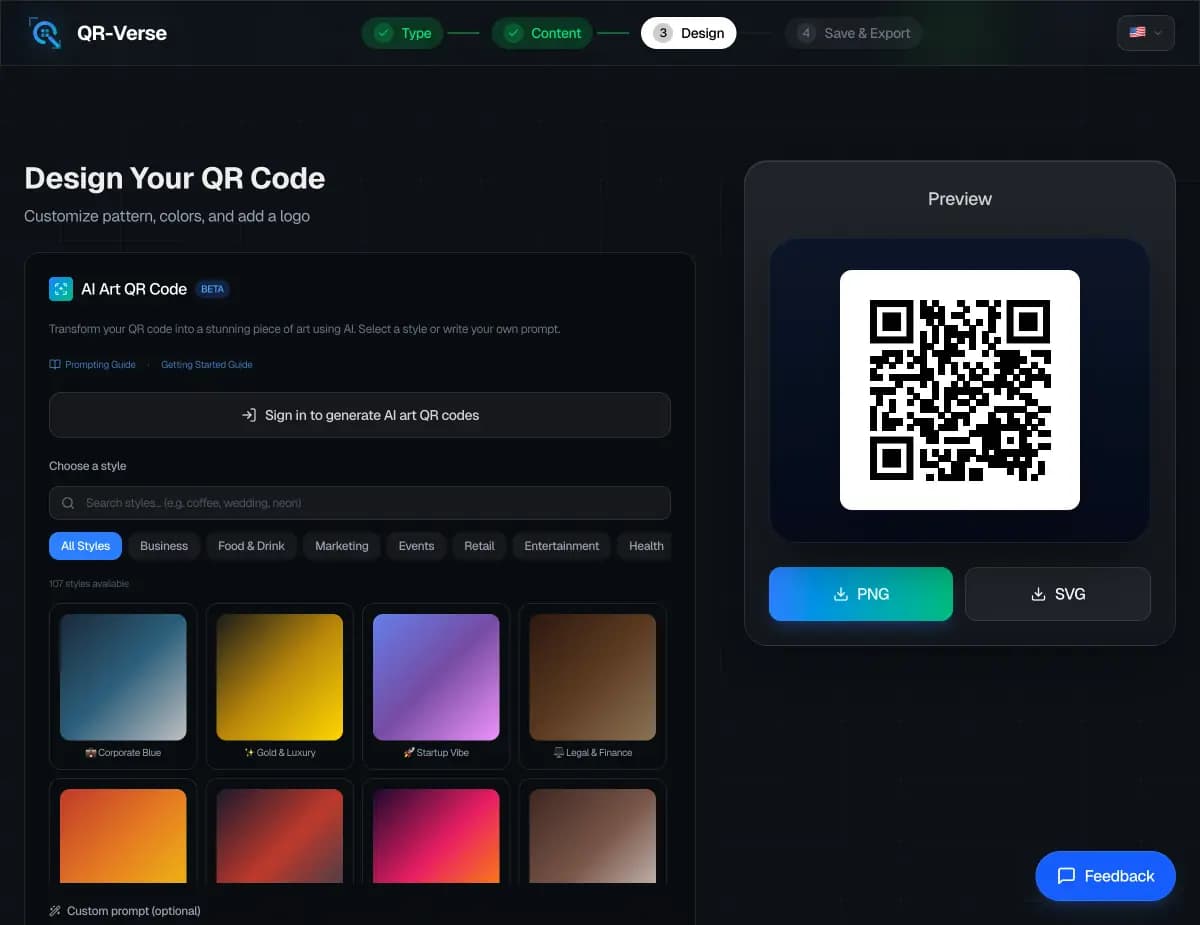
Download your AI art QR code
Select your favorite variation and download it. Your AI art QR code is stored permanently in your QR-Verse account and can be re-downloaded anytime. Before printing, always test the code by scanning it from your screen with at least two different phones to confirm readability.
Try the AI Art Generator
Transform any QR code into a unique piece of AI-generated artwork. 130+ presets, custom prompts, 4 variations per generation.
Create Your AI Art QR Code →130+ Style Presets for Every Industry
Not sure what to prompt? QR-Verse includes over 130 hand-crafted style presets organized into 26 categories. Each preset has been tested for scannability and visual quality, so you get reliable results without any prompt engineering.
Here are some of the most popular categories:
Business & Corporate
Professional aesthetics designed for business cards, pitch decks, and corporate communications. Includes presets like Corporate Blue, Gold and Luxury, Minimalist Office, and Executive Boardroom. Clean lines, muted palettes, and premium textures.
Food & Drink
Warm, appetizing styles perfect for restaurant menus, food packaging, and cafe signage. Coffee House, Sushi Bar, Italian Kitchen, Craft Brewery, and Bakery presets capture the texture and mood of different cuisines.
Nature & Outdoors
Organic textures and natural color palettes. Forest Canopy, Ocean Depths, Mountain Summit, Desert Sands, and Wildflower Meadow bring the beauty of the natural world into your QR design. Ideal for eco-brands, outdoor events, and wellness businesses.
Events & Celebrations
Festive designs for invitations, tickets, and event marketing. Wedding Elegance, Concert Energy, Birthday Party, Gala Night, and Festival Vibes cover the full spectrum. Pairs perfectly with QR codes for wedding RSVPs and event check-ins.
Technology & Digital
Futuristic and technical aesthetics for tech companies, SaaS products, and digital-first brands. Circuit Board, Digital Mesh, Neon Grid, Holographic, and AI Neural Network deliver a high-tech feel that resonates with tech-savvy audiences.
Retail & Shopping
Polished, commercial styles for product packaging, storefronts, and promotional materials. Luxury Display, Boutique Window, Shopping District, and Retail Elegance help your QR codes match the visual standards of premium retail environments.
Seasonal & Holiday
Timely designs that change with the calendar. Christmas Wonderland, Autumn Harvest, Summer Beach, Spring Bloom, and Halloween Night let you run seasonal campaigns with QR codes that feel current and relevant.
Minimal & Abstract
Less-is-more designs for brands that value clean aesthetics. Clean Lines, Monochrome, Geometric Abstract, Soft Gradient, and Paper Texture deliver understated elegance. These often score highest on scannability because of their strong contrast.
Each preset is a starting point. You can select a preset, see the prompt it uses, modify it to match your specific needs, and generate from there. Think of presets as expert-written prompts that you can customize.
Style Preset Examples
Here are real AI art QR codes generated using some of QR-Verse's most popular presets. Each one is fully scannable:
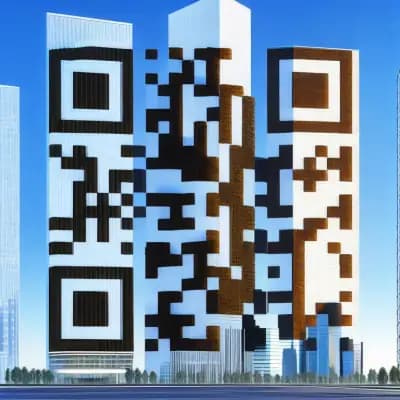
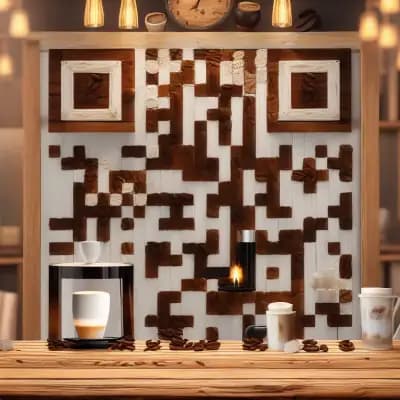
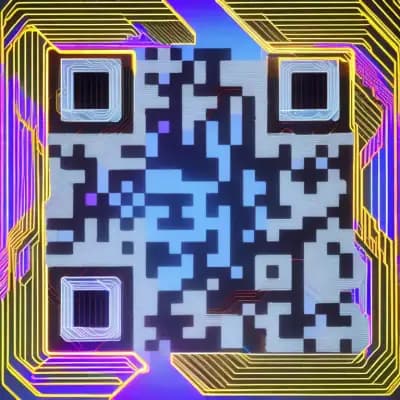
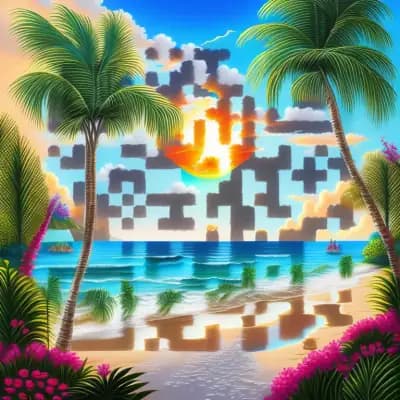
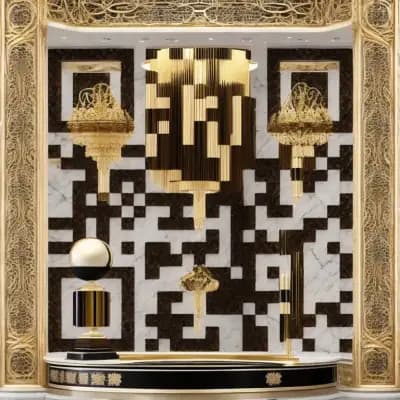
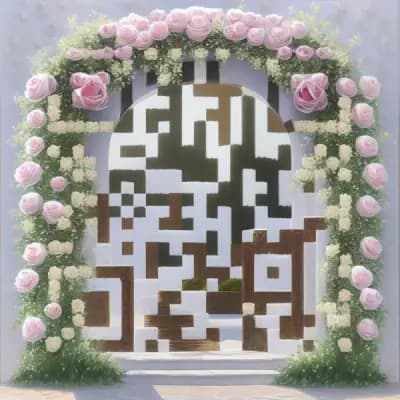
These examples showcase the range of styles possible with AI art QR codes. From corporate professionalism to romantic elegance, the same technology adapts to any visual direction. Try any of these presets yourself - it takes less than two minutes.
Master the Art of Prompting
Custom prompts are where the AI Art Generator truly shines. A well-crafted prompt is the difference between a generic result and a piece of art that perfectly represents your brand. Here is how to write prompts that produce stunning, scannable QR codes.
The Four Elements of a Great Prompt
Every effective AI art QR code prompt contains four key elements:
-
Subject - What is depicted in the image? A garden, a cityscape, a coffee cup, an abstract pattern? Be specific. "A garden" is vague; "a Japanese zen garden with raked sand and moss-covered stones" gives the AI a clear mental picture.
-
Style - How is it rendered? Watercolor, oil painting, digital illustration, 3D render, pixel art, pencil sketch? The style defines the visual language of your artwork.
-
Mood - What feeling should it evoke? Warm and inviting, cool and professional, energetic and bold, calm and serene? Mood words like "peaceful," "dramatic," or "vibrant" steer the color palette and composition.
-
Quality keywords - Technical terms that push the output toward higher fidelity. "Highly detailed," "8k resolution," "professional photography," "award-winning illustration" - these act as quality boosters.
The prompt formula: [Subject] + [Style] + [Mood] + [Quality]. For example: "A Japanese zen garden with raked sand and stone lanterns, watercolor painting style, peaceful morning atmosphere, highly detailed, soft natural lighting." This gives the AI a clear direction across all four dimensions.
Five Prompts for Different Industries
Here are tested prompts that produce excellent results for common use cases:
Restaurant or Cafe: "A cozy Italian trattoria with warm candlelight on rustic wooden tables, olive oil bottles and fresh herbs, oil painting style, warm inviting atmosphere, rich textures, highly detailed"
Tech Startup: "A futuristic server room with glowing blue data streams and holographic displays, digital art style, cool professional atmosphere, clean geometric lines, 8k render, cinematic lighting"
Wedding: "A romantic garden with white roses, soft morning light through a floral archway, watercolor illustration style, dreamy ethereal mood, pastel colors, delicate brushstrokes"
Real Estate: "A modern luxury home exterior with manicured landscaping at golden hour, architectural photography style, warm aspirational mood, sharp details, professional real estate aesthetic"
Fitness or Wellness: "A serene mountain yoga retreat at sunrise with mist rolling through pine trees, digital painting style, calm energizing atmosphere, natural earth tones, highly detailed landscape"
What to Avoid in Your Prompts
Certain prompt patterns produce QR codes that look impressive but fail to scan. Keep these pitfalls in mind:
- Avoid busy central focal points - The center of a QR code contains critical alignment patterns. Prompts that place a large, high-detail object dead center (like "a face looking directly at the camera") can interfere with scannability.
- Avoid very low contrast themes - Prompts like "a white cat in a snowstorm" or "a dark cave at midnight" produce images without enough contrast between light and dark areas. QR scanners need clear differentiation.
- Avoid extremely fine textures - "A detailed Persian carpet pattern" or "a page of tiny handwritten text" creates visual noise that competes with the QR modules.
- Avoid text in your prompts - AI-generated text within images is notoriously garbled. Requesting "a sign that says WELCOME" will likely produce unreadable letterforms that clutter the composition.
If your AI art QR code looks beautiful but does not scan, the most common fix is to increase the QR Visibility slider. This strengthens the ControlNet signal, making the QR pattern more pronounced within the artwork. You sacrifice some artistic freedom, but gain reliable scannability. For detailed prompting techniques, see our AI art prompting guide.
Advanced Settings Deep Dive
The AI Art Generator includes two advanced controls that let you fine-tune the balance between art and function. Understanding these settings helps you get the exact result you want.
QR Visibility (ControlNet Scale: 0.5 to 3.0)
This slider controls how strongly the QR code pattern influences the generated image. Think of it as a dial between "pure art" and "clearly a QR code."
- Low values (0.5-1.0): The AI has more creative freedom. The artwork is more immersive and beautiful, but scannability may be unreliable. Best for artistic display pieces where scanning is a bonus, not a requirement.
- Mid values (1.0-1.8): The sweet spot for most use cases. The QR pattern is clearly present but integrated naturally into the composition. Reliable scanning with strong visual appeal.
- High values (1.8-3.0): The QR pattern dominates. The artwork is more subtle, acting as texture and color around a clearly visible code. Best for high-reliability applications where every scan must work - print materials, product packaging, and anything scanned in variable lighting conditions.
Prompt Adherence (Guidance Scale: 5 to 20)
This slider controls how literally the AI interprets your text prompt.
- Low values (5-8): The AI takes significant creative liberties. Your prompt is a loose suggestion. Results can be surprising and serendipitous, but may not match your expectations closely.
- Mid values (8-12): A balanced interpretation. The AI follows the main themes and style of your prompt while still adding its own creative touches. This is the default and recommended range.
- High values (12-20): The AI follows your prompt very literally. The output closely matches what you described, with less creative variation between the four generated images. Best when you have a very specific vision and need the results to match it precisely.
For print applications: Use QR Visibility at 1.5 or higher and Prompt Adherence around 10. Print introduces variables - paper texture, ink absorption, viewing angle, lighting - that can reduce scannability. A slightly stronger QR pattern compensates for these real-world conditions.
For digital use (websites, social media, email): You can go more artistic. QR Visibility at 1.0-1.3 works well because screens offer consistent contrast and users can zoom in if needed.
Tips for Better AI QR Code Art
Whether you are using QR-Verse or any other QR art generator, these practical tips will help you produce AI-generated QR codes that look stunning and scan reliably every time.
1. Start with a Preset, Then Customize
The fastest path to a great result is to start with one of the 130+ presets in the QR-Verse AI art generator, then modify the prompt to match your specific brand. Presets are already optimized for scannability, so you get a proven foundation with your personal creative twist.
2. Prioritize Contrast Over Color
QR scanners read luminance (brightness), not color. A bright red on a dark green background has excellent contrast - a bright red on a bright blue does not. When choosing or writing prompts, think in terms of light versus dark, not color versus color.
High-contrast prompt examples that scan well:
- "Glowing neon signs against a dark city alley at night"
- "White marble architecture against a deep blue sky"
- "Golden wheat field with dark storm clouds above"
Low-contrast prompts to avoid:
- "Pastel watercolor flowers in soft morning light" (everything is similarly bright)
- "Dark forest interior at twilight" (everything is similarly dark)
3. Test on Multiple Devices Before Printing
Your iPhone might scan a QR code flawlessly, but an older Android phone might struggle. Always test your AI art QR code on at least two different devices - ideally one iPhone and one Android phone - before committing to print. Scan from the screen first, then from a test print.
4. Size Matters: Go Bigger for AI Art
Standard QR codes can be reliably scanned at 2cm x 2cm. AI art QR codes need a bit more room because the artistic elements add visual complexity. We recommend a minimum of 2.5cm x 2.5cm for print, and 3cm x 3cm or larger for anything that will be scanned from a distance (posters, signs, banners).
5. Use Dark Backgrounds for Colorful Subjects
If your prompt involves colorful, vibrant subjects - think anime characters, tropical birds, kaleidoscopic patterns - always specify a dark background. This ensures the bright subject elements naturally create the light QR modules against dark QR modules. Add phrases like "dark background," "black environment," or "dramatic shadows" to your prompt.
6. Regenerate Freely and Compare
Each generation produces 4 unique variations. Do not settle for your first attempt. Regenerate two or three times, adjust your prompt slightly each time, and compare results across batches. The difference between a good AI QR code and a great one is often just one or two regenerations. At $0.05 per image, experimentation is cheap.
7. Match the Art Style to Your Use Case
The art style should reinforce the context where the QR code will be seen:
| Use Case | Recommended Styles |
|---|---|
| Business cards | Corporate Blue, Minimalist, Gold Luxury |
| Restaurant menus | Coffee House, Italian Kitchen, Sushi Bar |
| Wedding invitations | Floral Watercolor, Romantic Garden, Soft Pastel |
| Tech products | Circuit Board, Neon Grid, Digital Mesh |
| Retail packaging | Luxury Display, Brand-matched custom prompts |
| Event posters | Concert Energy, Festival Vibes, Neon City |
Put These Tips into Practice
Open the QR-Verse AI Art Generator, pick a preset or write a custom prompt, and create your first AI QR code art in under 2 minutes.
Try the AI Art Generator Free →AI QR Code Art for Business
AI-generated QR code art is not just a design novelty - it is a strategic business tool. Here is how businesses across industries are using AI QR code art generators to drive measurable results.
Restaurants and Hospitality
Restaurants invest heavily in ambiance. A plain black-and-white QR code on a carefully designed table tent undermines that investment. An AI art QR code styled to match the restaurant's interior - rustic textures for a farmhouse kitchen, sleek metallics for a modern sushi bar, warm candlelight for an Italian trattoria - becomes part of the dining experience rather than a visual intrusion.
Early adopters report that AI-styled menu QR codes receive more scans than their standard counterparts, with patrons frequently commenting on and photographing the codes. For a complete walkthrough, see our restaurant QR code menu guide.
Real Estate
In real estate, first impressions happen at the curb. A "For Sale" sign with a generic QR code signals "afterthought." An AI-generated code featuring architectural elements, warm residential lighting, or modern design aesthetics signals "this property is worth your attention" - before anyone even picks up their phone.
Agents are using AI art QR codes on yard signs, open house flyers, and property brochures, linking to virtual tours, listing pages, or vCard contact details. The visual quality of the QR code itself communicates the quality of the property and the professionalism of the agent. Read more in our QR codes for real estate guide.
Events and Conferences
Concert posters, festival wristbands, conference badges, and trade show booths all need QR codes for tickets, schedules, networking, and check-in. A standard code is forgotten the moment it is scanned. An AI art code matching the event theme - neon and electric for a music festival, corporate elegance for a business summit - becomes a keepsake and a social media post.
Event organizers using event QR codes with AI-generated art report higher pre-event engagement when the QR code itself is share-worthy on social media. For a full playbook, see our events, festivals, and conferences guide.
Retail and Product Packaging
Premium brands invest millions in packaging design. A plain QR code on the back of a luxury candle, artisan chocolate bar, or craft spirit bottle looks cheap and out of place. An AI art QR code styled to match the packaging - same color palette, same visual language, same brand energy - maintains design integrity from shelf to scan.
Pair AI art QR codes with URL QR codes linking to product pages, loyalty programs, or authentication workflows. The visual quality signals authenticity, which is increasingly important as consumers demand transparency about sourcing and ingredients. Explore more in our retail and e-commerce QR guide.
Marketing Campaigns
Campaign-specific AI QR codes perform better than generic ones because they reinforce the creative direction. A summer campaign gets a sun-drenched beach aesthetic. A product launch gets futuristic neon. A holiday sale gets festive warmth. Each code is a micro-touchpoint that extends the brand narrative.
Combine AI art QR codes with social media QR codes to drive follower growth from print materials, or use them in digital marketing campaigns where the QR code bridges offline and online channels.
For a deeper analysis of AI QR code business strategy, including ROI data and industry-specific playbooks, read our dedicated article: AI QR Codes for Business: Strategy and Real Results.
Real-World Use Cases
AI art QR codes are not a novelty - they solve real design problems across industries. Here is how different professionals are using them.
Restaurants and Cafes
A standard QR code on a table tent clashes with carefully designed interiors. An AI art QR code styled to match your restaurant's aesthetic - rustic textures for a farmhouse kitchen, sleek metallics for a modern sushi bar - becomes part of the decor rather than a distraction. Your digital menu QR code can look as curated as the rest of your space.
Weddings and Events
Wedding invitations are a design statement. A black-and-white QR code undercuts the elegance of letterpress on cotton stock. An AI art QR code generated with a "romantic floral watercolor" prompt integrates seamlessly with the invitation design. Guests actually comment on how beautiful it looks. See our full wedding QR code guide for more ideas.
Retail and Product Packaging
Premium brands invest heavily in packaging design. A plain QR code on the back of a luxury candle or artisan chocolate bar feels cheap. An AI art QR code styled to match the packaging art - same color palette, same visual language - maintains brand consistency from label to scan. Pair it with a URL QR code linking to your product page.
Real Estate
Open house flyers and yard signs benefit from property-styled QR codes. An AI-generated code featuring architectural elements, warm residential vibes, or modern home interiors reinforces the listing's character and catches the eye of passersby. It says "this property is worth your attention" before anyone even scans. Link it to a vCard with your agent details.
Events and Festivals
Concert posters, festival wristbands, and conference badges need QR codes for tickets, schedules, and networking. An AI art code matching the event theme - neon and electric for a music festival, corporate and clean for a business conference - turns a functional element into an extension of the event brand. Use event QR codes for seamless check-in.
Marketing Campaigns
Campaign-specific branded QR codes perform better than generic ones. A summer campaign gets a sun-drenched beach QR code. A product launch gets a futuristic tech aesthetic. Each campaign's QR code becomes a visual extension of its creative direction, reinforcing the message before the scan even happens. Combine with social media QR codes to drive followers.
Best AI QR Code Art Generators in 2026
With AI QR code art gaining mainstream popularity, several tools have entered the market. Here is a detailed comparison of the best AI QR code art generators in 2026 to help you choose the right platform.
Tool-by-Tool Comparison
| Feature | QR-Verse | Quick QR Art | QR Diffusion | Canva | OpenArt | Pincel |
|---|---|---|---|---|---|---|
| Technology | ControlNet + SD | ControlNet | ControlNet + SD | Proprietary | ControlNet | ControlNet |
| Style presets | 130+ | 20+ | 15+ | 10+ | 10+ | 5+ |
| Custom prompts | 1,000 chars | Yes | Yes | No | Yes | Limited |
| Variations per gen | 4 | 1 | 1-2 | 1 | 1 | 1 |
| QR code creation | Built-in (20+ types) | Basic URL only | Basic URL only | Separate tool | URL only | URL only |
| Visibility control | Full slider (0.5-3.0) | Limited | Yes | No | Limited | No |
| Price per image | $0.05 | $0.20+ | Free tier + paid | Canva Pro required | Free tier + paid | Free tier + paid |
| Resolution | 768x768 | 512-768 | 768x768 | 512x512 | 512x512 | 512x512 |
| Account required | For AI credits only | Yes | Optional | Yes | Yes | Optional |
What Makes a Great QR Art Generator
Not all AI QR code generators are created equal. The best AI QR code generator tools share these critical characteristics:
-
Reliable scannability - An AI QR code that does not scan is just a pretty picture. The best generators use ControlNet or similar structural control technology to ensure the QR pattern is properly integrated, not just visually approximated.
-
Style variety - A single art style gets boring fast. Look for generators with diverse presets and custom prompting to match any brand or occasion.
-
Multiple variations - Generating one image and hoping for the best is not enough. The best tools produce multiple variations per generation so you can compare and choose.
-
Integration with QR creation - A standalone AI image generator that you then have to manually convert into a QR code is cumbersome. The best tools combine QR code creation and AI art generation in a single workflow.
-
Fine-grained control - The ability to adjust how strongly the QR pattern shows through the art (ControlNet scale) makes the difference between a tool you use once and a tool you rely on.
-
Fair pricing - AI image generation costs compute resources, but pricing should be transparent and accessible. Beware tools that charge subscription-only with no pay-as-you-go option.
Why QR-Verse Leads in 2026
QR-Verse checks every box and then some:
- ControlNet + Stable Diffusion - The gold standard for AI QR code generation, ensuring both artistic quality and reliable scannability
- 130+ style presets across 26 categories - More variety than any competitor
- Custom prompts up to 1,000 characters - Full creative control when you need it
- 4 unique variations per generation - Real choice, not minor tweaks
- All-in-one workflow - Create your QR code content, apply AI art, and download in a single session on the create page
- $0.05 per image - Among the most affordable options available (or included with Pro at 50 credits/month)
- 20+ QR code types - AI art works with URLs, WiFi, vCards, menus, events, social media, and more
- Free standard QR codes - No limits, no watermarks. AI art is an optional premium layer on top of a fully functional free QR code generator
Most competitor tools only generate AI art for basic URL QR codes and require you to create the QR code data separately. QR-Verse is the only platform where you can select from 20+ QR code types, enter your content, apply AI art, and download - all in one workflow without leaving the page.
Not ready to invest in AI art credits yet? Start by creating a free standard QR code with custom colors, logos, and frames. When you are ready to level up, the AI Art Generator is one click away in the same workflow. You can also explore all QR code solutions to find the right type for your use case.
Try the Best AI QR Code Art Generator
130+ presets, custom prompts, ControlNet technology, and 4 unique variations per generation. Create stunning, scannable AI art QR codes in under 2 minutes.
Create Your AI Art QR Code - Free →Pricing That Makes Sense
QR-Verse's AI Art Generator uses a credit-based system that keeps pricing simple and transparent. Each credit generates one batch of 4 unique AI art variations.
Free users can purchase credits at $0.99 for 5 credits. That is $0.20 per generation, and each generation produces 4 unique images - effectively $0.05 per AI art QR code variation. There is no subscription, no monthly minimum, and credits do not expire.
Pro users receive 50 AI art credits per month as part of their subscription, alongside all other Pro features like advanced analytics, bulk QR generation, and custom short domains. For businesses running regular campaigns, the included credits cover most needs without additional cost.
Creating static QR codes (without AI art) is completely free on QR-Verse - unlimited, no watermarks, no account required. The free plan also includes 1 dynamic QR code with 60-day analytics. AI art credits only apply to the AI Art Generator feature. You can customize colors, patterns, logos, and frames on any QR code at no cost. Read our full breakdown of free QR code features.
Every generation produces 4 variations, so even a single credit gives you real choice. If none of the four variations meet your standards, you can adjust your prompt or settings and generate again - each new generation costs one additional credit.
Frequently Asked Questions
Are AI art QR codes scannable?
Yes. AI art QR codes generated by QR-Verse are real, functional QR codes. The ControlNet technology ensures the QR pattern is embedded into the artwork with sufficient contrast for scanners to read. That said, highly artistic settings (low QR Visibility) can reduce reliability. Always test by scanning from your screen with at least two different phones before printing or sharing.
What if my AI art QR code won't scan?
Increase the QR Visibility slider and regenerate. This strengthens the ControlNet signal, making the QR pattern more pronounced. You can also try simplifying your prompt - removing busy textures and ensuring your prompt includes high-contrast elements. If you are printing, make sure the code is at least 2cm x 2cm and printed on a non-reflective surface.
Can I use my own custom prompt instead of presets?
Absolutely. The custom prompt field supports up to 1,000 characters. You can write a prompt from scratch, modify a preset, or combine elements from multiple presets. Custom prompts give you full creative control over the final artwork.
How long does AI art generation take?
Between 30 and 90 seconds per generation. The AI produces 4 unique 768x768 pixel variations in each batch. Generation time depends on server load and the complexity of your prompt, but most requests complete within a minute.
Can I use AI art QR codes commercially?
Yes. QR codes you generate on QR-Verse, including AI art versions, are yours to use for any purpose - personal, commercial, or promotional. You retain full usage rights to the generated images. There are no royalty fees or attribution requirements for the AI-generated artwork.
Do I need an account to use the AI Art Generator?
You need a QR-Verse account to purchase or use AI art credits, since credits are tied to your account. Creating a standard QR code does not require an account, but the AI Art Generator feature does. Account creation is free and takes about 30 seconds.
What AI model powers the generator?
QR-Verse uses Stable Diffusion combined with ControlNet, accessed via the Replicate API. ControlNet is the specific technology that allows the QR code pattern to be structurally integrated into the AI-generated artwork, rather than simply overlaid. This combination produces the best balance of artistic quality and scan reliability available today.
Can I regenerate if I don't like the results?
Yes. Each generation costs one credit and produces 4 new variations. If none of the four appeal to you, adjust your prompt, tweak the advanced settings, or try a different preset, then generate again. There is no limit on how many times you can regenerate - it simply costs one credit per attempt.
Is the AI QR code generator free?
Creating standard QR codes is completely free on QR-Verse with no limits or watermarks. The AI art feature uses a credit system: free users can buy 5 credits for $0.99 ($0.05 per image), and Pro subscribers get 50 credits per month included. Start with a free QR code and add AI art whenever you are ready.
What is the best AI QR code generator in 2026?
QR-Verse is widely considered the best AI QR code generator in 2026, offering 130+ style presets, custom prompts up to 1,000 characters, ControlNet + Stable Diffusion technology, 4 unique variations per generation, and 20+ QR code types - all at $0.05 per image. The all-in-one workflow combines QR creation and AI art in a single session.
How is an AI QR code different from a standard QR code?
A standard QR code is a plain black-and-white grid. An AI QR code integrates the functional pattern into AI-generated artwork using ControlNet, creating a single cohesive image that is both beautiful and scannable. AI QR codes see up to 30% higher scan rates because they attract attention and create curiosity. See our full comparison above for details.
What resolution are AI art QR codes?
AI art QR codes are generated at 768x768 pixels, which is suitable for both digital use (websites, social media, email) and print applications. For large-format printing, the high resolution ensures crisp, detailed output that maintains both visual quality and scannability.
How do I make QR code art with AI?
The easiest way to make QR code art with AI is to use QR-Verse's built-in AI Art Generator. Go to the create page, select your QR code type, enter your content, then navigate to the Customize step and open the AI Art panel. Choose from 130+ presets or write a custom prompt, adjust the QR Visibility slider if needed, and generate. You will get 4 unique variations in under 90 seconds. No design skills or AI expertise required.
What is the difference between QR code art generators?
The main differences between QR code art generators are: the underlying AI technology (ControlNet-based tools produce far better results than simple overlay tools), the number of style presets, whether you can write custom prompts, how many variations you get per generation, and whether QR code creation is built in or requires a separate step. QR-Verse leads in all these categories with ControlNet + Stable Diffusion, 130+ presets, custom prompts, 4 variations, and an all-in-one workflow.
Can I create AI QR code art for free?
You can create standard QR codes completely free on QR-Verse with no limits or watermarks. The AI art generation feature uses credits: 5 credits for $0.99, with each credit producing 4 unique image variations. That works out to $0.05 per AI art image. Pro subscribers get 50 credits monthly. While the AI art feature is not entirely free, the cost per image is minimal, and the underlying QR code creation is always free.
Which industries benefit most from AI QR code art?
AI QR code art delivers the strongest ROI in industries where visual presentation matters and QR codes are customer-facing: restaurants and hospitality (menu QR codes that match the decor), real estate (property-styled codes on yard signs and flyers), events and festivals (event QR codes that extend the brand), retail and product packaging (design-integrated codes on premium products), and marketing campaigns (theme-matched codes that reinforce creative direction). Any industry where brand aesthetics influence customer perception benefits from AI QR art.
Turn Every QR Code into a Conversation Starter
Standard QR codes are invisible. People walk past them, scroll past them, and ignore them - not out of disinterest, but because a black-and-white grid gives them no reason to care.
An AI art QR code changes that dynamic entirely. It stops people. It makes them curious. It earns the scan instead of demanding it. And with QR-Verse's AI QR code art generator, creating one takes less time than writing a social media post.
Whether you are building a brand, planning an event, running a restaurant, or launching a product, your QR code deserves to look as good as everything else you create. With 130+ style presets, custom prompting, and fine-tuned ControlNet controls, you have everything you need to make it happen.
Here are some helpful resources to get started:
- Create your first AI art QR code - The all-in-one QR code creator with built-in AI Art Generator
- AI QR code generator page - Explore the full AI art feature with gallery, presets, and pricing
- AI QR codes for business - Strategy guide with ROI data and industry playbooks
- Free QR code generator guide - Everything you can do for free on QR-Verse
- Static vs dynamic QR codes - Choose the right foundation before adding the art layer
- QR code solutions - Browse all 20+ QR code types
- URL QR codes - The most popular QR code type
- WiFi QR codes - Share network access with a scan
- vCard QR codes - Digital business cards
- Restaurant menu QR codes - Touchless dining menus
- Social media QR codes - Connect all your profiles
- Event QR codes - Invitations and check-ins
Create Your AI Art QR Code
Transform any QR code into stunning, scannable artwork with AI. 130+ presets, custom prompts, and 4 unique variations per generation.
Create Your AI Art QR Code - Free →Ready to create your QR code?
Free plan available. No signup required. Create professional QR codes in seconds.
Ready to try it yourself?
Create professional QR codes with tracking, custom colors, and AI-generated art.
Create your QR code in seconds
No signup, no credit card. 27 QR types with full customization. Upgrade to Pro (EUR 4.99/mo) for unlimited power.
Share this article
Related Articles

AI QR Code Art for Business: Brand Guide 2026
Discover how restaurants, fashion brands, tech startups, and content creators use AI-generated QR code art to boost scan rates by 30% in 2026.
Read More
AI QR Codes for Business: Strategy and Real Results (2026)
Learn how brands use AI QR codes to increase scan rates by 40% and strengthen their branding. Strategy guide with real ROI numbers.
Read More
Branded QR Codes: Colors, Logos & Design Guide
Create branded QR codes with your colors, logo, and custom design. Free guide for on-brand QR codes that generate 80% more scans.
Read More